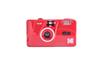
Explanation by manufacturer
You can easily enjoy tasteful images that are different from digital cameras
A simple film camera that allows you to enjoy repeated shooting. The built-in flash can also be used indoors. It is an easy operation that does not require aperture or focus adjustments, so even first-time users can easily use it.
Kodak Camera Q&A
Q. What do I need after purchasing until shooting
A. Please prepare 135mm film and 1 alkaline AAA battery. (sold separately)
Q. I can't roll up the film
A. Make sure the film is properly loaded. If there is no number displayed on the sheet count counter, please reload the film. Make sure that the film perforation (upper and lower holes) is aligned with the lower protrusion (upper and lower holes) of the camera's film winding shaft (the axis on the right side when opening the lid) and the wheel under the viewfinder, and then close the back cover.
Q. I can't close the shutter
A. After loading the film, turn the rollover dial (right side looking into the viewfinder) until it stops. When it doesn't stop, the film isn't rolled up. Please reload it.
Q. The flash doesn't fire
A. Make sure the battery is loaded and +- is loaded. When the charge lamp (orange lamp) is on, flash photography becomes possible
. If you leave the flash switch on, the battery will run out, so please turn off the switch when not in use. If charging takes time, we recommend replacing the battery.
Q. The flash fires, but I can't take a good picture
A. The range that flash light can reach varies depending on the film used. <M35>・ISO sensitivity 200: approx. 1.0 m to 1.5 m・ISO sensitivity 400: approx. 1.8 to 2.1 m*Reference value from condenser capacity When showing dark, the distance to the subject (subject to be photographed) is far, the flash is not charged, and if it appears white, it is possible that the distance to the subject (shooting target) is too close
Q. When using the flash, a number of large and small white balls (patterns) are shown on the screen.
A. In flash photography, a dust-like object (including raindrops and snow) floating right in front of the lens was shown blurry. This unit has a wide (deep) focus range, and small dust in front of the lens shines during flash photography, and may be reflected as large and small white balls.
Q. The actual image range is wider than the range that can be seen from the viewfinder
A. The viewfinder field of view ratio is 70% (from the center of 100% of the overall image) to reduce the fact that 30% of the outside image is not visible. For example, it reduces the phenomenon that only half of the people on the left and right are shown in group photos.
Q. When I took the picture and put it out for development, nothing was shown on the negative.
A. If information such as frame numbers can be read in the empty parts of the holes (perforations) on both sides of the film, it is likely that there was no problem with the development process. Possible causes depending on the condition of the image part are as follows. ① When a thin image can be confirmed · Shoot in a dark place such as at night or indoors without using a flash. ・The shot was taken at a distance where the flash could not reach. ② When images cannot be confirmed at all · An unshot film was mistakenly displayed for development. ・External shocks, such as hitting or dropping the camera, were applied, and shutters etc. broke down. ・Dirt and sand got inside the camera and settled in the working part. ③ How to handle film · Since it was left in a place where it becomes hot (on a closed car dashboard, near a stove, etc.), the film emulsion changes due to heat. ・After shooting, I opened the back cover of the camera and rewound it. Even if the film is sensitive to light and developed, the image is not reproduced.
Q. I can see both ends of the screen bent. Is it a breakdown?
A. This is a phenomenon where the surrounding image is distorted due to the characteristics of the lens. The center of the image hardly bends, but the surrounding area is distorted. It is an effect of “distortion aberration” due to optical characteristics.
Q. A red, blurry shadow appeared in the corner of the photo.
A. The red, fuzzy shadow seems to have been a reflection of a finger. This unit is small and the lens doesn't stick out in front of it for a long time, so there is a possibility that your finger will stick out in front of the lens.
.
.
FILM LOADING PROCEDURE
FILM LOADING PROCEDURE
1. Lower the lever on the side of the camera to open the back cover
2. Pull up the rewind crank before loading the film
3. Put the film into the film chamber
4. After loading the film, put the rewind crank back down
5. Pull the film from the left side to the right side and hook the tip of the film to the protrusion of the winding spool on the right
6. Check if the hole in the film and the gear on the camera side are meshed
7. Turn the film roll up dial to advance the film so that the film is flat and close the lid
8. Turn the roll-up dial until it stops and press the shutter repeatedly, and the counter is “1” and ready to shoot
.
.
How to take out the film
1. Press the rewind button on the bottom of the camera
2. Rotate the film rewind handle clockwise
3. Open the back cover, raise the rewind crank, and remove the film
4. For the film, go to the development shop
{'isProductSummaryAvailable': false, 'device': 'desktop'}
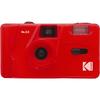
135 film (35mm film) camera
built-in flash
Set includes: camera body, hand strap
Batteries used: 1 x AAA alkaline battery (batteries not included)
Weight: Approx. 100g (film and batteries not included)
To request a return or exchange, please note that it is mandatory to provide a video of the unpacking of the package.
![Kodak [domestic Genuine Product Warranty Included] Kodak Film Camera M35 Purple Purple](https://img.joomcdn.net/97795cf46672892767db9244bad25136f83d370f_original.jpeg)
![Kodak [domestic Genuine Product Warranty Included] Kodak Film Camera M35 Purple Purple](https://img.joomcdn.net/f24140b9513a9a840cbdf10da55bf2cd6d583fe1_original.jpeg)
![Kodak [domestic Genuine Product Warranty Included] Kodak Film Camera M35 Purple Purple](https://img.joomcdn.net/7fa7af4c8b948b515e0a8c505099f1cdf8dd09eb_original.jpeg)
![Kodak [domestic Genuine Product Warranty Included] Kodak Film Camera M35 Purple Purple](https://img.joomcdn.net/c72ca0d4332607374de0215307e1d51a9de9c6ef_original.jpeg)
![Kodak [domestic Genuine Product Warranty Included] Kodak Film Camera M35 Purple Purple](https://img.joomcdn.net/18298b78acd4d3555225e93266de828c468f5a72_original.jpeg)
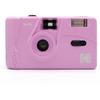


 Remboursement en cas de non-livraison
![[Produit Officiel Japonais/Garantie Incluse] Appareil Photo Argentique Kodak M35 Violet](https://img.joomcdn.net/7d9b32a4d2b67e0cac81b9943db0250698f3d3f6_100_100.jpeg)
![[Garantie incluse] Appareil photo Kodak Film M35 Vert Menthe](https://img.joomcdn.net/bb4396bdef5bcd12eb145f92cf8c4861275bc1d6_100_100.jpeg)
![[Produit Officiel Japonais/Garantie Incluse] Appareil Photo Argentique Kodak M38 Pamplemousse](https://img.joomcdn.net/3d29723e54bdac02b13b574cbb32791c64b054ac_98_100.jpeg)
![[Garantie incluse] Appareil photo Kodak Film M35 Vert Menthe](https://img.joomcdn.net/7927dda7d8b2e49999eecda7d85032cc6c9a5f08_100_100.jpeg)

![[Produit Officiel Japonais/Garantie Incluse] Appareil Photo Argentique Kodak M35, Jaune](https://img.joomcdn.net/1dd02887eb558581b8e128f34eb52ba3352a04c7_100_100.jpeg)

![Kodak Appareil photo argentique M35 Jaune [/Garantie incluse]](https://img.joomcdn.net/a54b5ff4e0ba41479c6bbba3c6ee0d41e35dc4ab_100_100.jpeg)
![[Garantie incluse] Appareil photo Kodak Film M38 Pamplemousse](https://img.joomcdn.net/f4f85976ce0b2d4ced7fa56c37dbb7e9081646c0_100_100.jpeg)

![[Produit Officiel Japonais/Garantie Incluse] Appareil Photo Argentique Kodak M35 Vert Armée](https://img.joomcdn.net/c9ab3271119dde50125790833424b21207d48b37_100_95.jpeg)